
📘 PUMA Vault — Complete User Guide
PUMA — PUMA Understanding and Management with Agents
[!info] Overview
Can language models manage ICT projects? An empirical benchmark of local LLM agents for issue triage and effort estimation in ICT projects.
Version 1.0 · Updated June 2026
Quick Navigation
Destination Description index.md Published landing page README.md GitHub repository landing page 00 - Home.md Navigation hub
Vault Sections
| Section | Description |
|---|---|
| 00 - Meta | Templates, dashboards, plugin configuration |
| 10 - Inbox | GTD capture point — fleeting notes and quick capture |
| 20 - Literature | Papers, books, videos, tools, datasets |
| 30 - Permanent | Zettelkasten — concepts, methods, frameworks, results |
| 40 - Projects | Active project work — chapters, specs, experiments, BMAD |
| 50 - Areas | Ongoing responsibilities — research, writing, code, ethics |
| 60 - Resources | Prompts, workflows, checklists, glossary, bibliography |
| 70 - Archive | Completed and deprecated material |
| 80 - MOC | Maps of Content — navigation and synthesis layer |
| 90 - GTD | Tasks, reviews, sprint boards, someday/maybe |
What is this vault?
This is the PUMA Knowledge Vault — a professional workspace for the PUMA Project. It integrates four knowledge management systems (PARA, GTD, Zettelkasten, Johnny Decimal) with academic research workflows (SLR, DSR, Keshav Three-Pass) and development methodologies (SDD, BMAD, OpenSpec, CDD).
Single principle: every piece of information has a clear home, a clear purpose, and a clear path to the PUMA Project.
5-Minute Setup
- Open Obsidian → Open Vault → select this folder
- Trust author (for Templater to work)
- Install plugins: Settings → Community Plugins → Browse → install each plugin in
Recommended-Plugins - Set Homepage plugin: open
00 - Home.mdas startup page - Configure Zotero Connector: point to your Zotero library
- Run
git initin vault root if using Git backup
Daily Workflow (GTD)
Morning (10 min):
- Open
90 - GTD/95 Reviews/Daily-Review-Template→ create today’s note with Templater - Check
90 - GTD/91 Tasks/TASKS-Activefor overdue and due-today tasks - Check
10 - Inbox/for unprocessed fleeting notes
During work:
- New ideas/sources →
10 - Inbox/Fleeting-Notes/(use Template-Fleeting-Note) - New papers → use Zotero connector → routed to
20 - Literature/20.1 Papers/ - New tasks → inline
- [ ] Task 📅 YYYY-MM-DDin relevant project note
Evening (5 min):
- Process inbox items that accumulated
- Update task statuses
Weekly Workflow (GTD Weekly Review)
Every Sunday or Monday, open 90 - GTD/95 Reviews/Weekly-Review-Template:
- Process Inbox to zero
- Review all active projects (milestone progress, sprint board)
- Convert Fleeting Notes → Literature Notes or Permanent Notes
- Update MOCs with new connections
- Review Waiting For items (advisor feedback, etc.)
- Plan next week’s tasks
How to Add a New Paper
Option A — with Zotero (recommended):
- Import paper to Zotero → tag
#puma-include - Use Obsidian Zotero Integration plugin:
Ctrl+Shift+Z→ search → insert - Paper lands in
20 - Literature/20.1 Papers/as@citekey.md - Fill Keshav Three-Pass template
Option B — manual:
- Copy
00 - Meta/Templates/Template-Keshav-ThreePass.md - Place in appropriate
20 - Literature/20.1 Papers/[Topic]/subfolder - Fill all fields; set
status: to-read
How to Add a Permanent Note (Zettelkasten)
- Complete Keshav Pass-3 on a paper (or have a new insight)
- Copy
00 - Meta/Templates/Template-Permanent-Note.md - Title must be a declarative statement (e.g., “RAG retrieval improves precision when historical examples are structurally similar to the query”)
- Place in
30 - Permanent/31 Concepts/,32 Methods/, or33 Frameworks/based on content - Link to: source literature note, related permanent notes, relevant MOC
- Never move a permanent note — only add links
How to Run an Experiment
- Check spec in
40 - Projects/PUMA/41.6 Specs/— validate against constitution - Add experiment to
40 - Projects/PUMA/41.7 Experiments/using Template-Experiment-Note - Create task in
90 - GTD/96 Kanban/Sprint-02-Board.md - Run code (CodeCarbon wrapping all inference)
- Log results in
40 - Projects/PUMA/41.4 Results/ - Update
00 - Meta/Dashboards/Dashboard-Experiment-Status
Methodology Quick Reference
| When you… | Use this method | Notes live in |
|---|---|---|
| Capture a quick idea | GTD Capture → Fleeting Note | 10 - Inbox/ |
| Read a new paper | Keshav Three-Pass | 20 - Literature/ |
| Synthesise an insight | Zettelkasten Permanent Note | 30 - Permanent/ |
| Work on PUMA chapter | PARA Project | 40 - Projects/PUMA/ |
| Use AI assistance | RCOIF + CDD | 60 - Resources/61 Prompts/ |
| Plan a sprint | GTD + Agile | 90 - GTD/96 Kanban/ |
| Simulate agent team | BMAD | 40 - Projects/41.9 BMAD-Agents/ |
| Write a spec | SDD + Spec Kit | 40 - Projects/41.6 Specs/ |
| Find any file | Johnny Decimal | 60 - Resources/66 JD-Index/ |
| Navigate topics | MOC | 80 - MOC/ |
Plugin Quick Reference
| Plugin | Shortcut | Use |
|---|---|---|
| Dataview | auto | Dynamic tables and queries |
| Templater | Alt+T | Insert template into current note |
| Tasks | inline - [ ] | Task tracking everywhere |
| Kanban | open .md | Sprint board |
| QuickAdd | Ctrl+Shift+A | Fast note creation |
| Zotero Integration | Ctrl+Shift+Z | Import papers |
| Obsidian Git | Ctrl+Shift+G | Backup to GitHub |
| Calendar | sidebar | Navigate to any date |
File Naming Conventions
| Type | Prefix | Example |
|---|---|---|
| Literature Note | LN- | LN-Angermeir-2025-Reproducibility.md |
| OR Zotero citekey | @ | @Angermeir2025Reproducibility.md |
| Permanent Note | PN- | PN-RAG-Embeddings-VectorDB.md |
| Project Note | PR-PUMA- | PR-PUMA-Ch1-Introduction.md |
| Spec | SP- | SP-Architecture.md |
| Experiment | EX- | EX-Hypotheses-H1-H2.md |
| Prompt Template | PT- | PT-PUMA-Experiment-Prompts.md |
| Workflow | WF- | WF-SLR-Pipeline.md |
| Checklist | CL- | CL-Quality-Checklists.md |
| MOC | MOC- | MOC-PUMA-Master.md |
Vault Architecture (Johnny Decimal)
00 — Meta (templates, plugins, CSS)
10 — Inbox (GTD capture point)
20 — Literature (papers, books, datasets, tools)
30 — Permanent (Zettelkasten: concepts, methods, frameworks)
40 — Projects (PUMA: chapters, specs, experiments, BMAD)
50 — Areas (research quality, writing, code, sustainability)
60 — Resources (prompts, workflows, checklists, glossary, bibliography, JD-index)
70 — Archive (completed, deprecated)
80 — MOC (Maps of Content — navigation layer)
90 — GTD (tasks, reviews, kanban, someday/maybe)
Knowledge Management Methodologies
The vault fuses six complementary knowledge management systems into a single coherent workspace. Each system is not used in isolation — they reinforce each other, each covering a different dimension of the research lifecycle.
MOC — Maps of Content
MOC notes act as index pages that gather links to related notes by topic, forming a navigable graph of knowledge rather than a rigid hierarchy. Each major domain (agents, benchmarks, methods, tools, videos) has a dedicated MOC in 80 - MOC/81 Topic-Maps/. The MOC layer is the primary navigation surface for the vault; it replaces folders as the main organizational paradigm at the semantic level.
GTD — Getting Things Done
David Allen’s GTD system governs all task and commitment management. The vault’s 90 - GTD/ area houses the active task list, master projects list, and someday/maybe queue. Daily and weekly reviews (templated) ensure that captured tasks are processed, clarified, and either acted upon, deferred, or discarded. GTD prevents the research inbox from becoming a graveyard of unprocessed ideas.
PARA — Projects · Areas · Resources · Archive
Tiago Forte’s PARA framework provides the macro-level organizational skeleton. 40 - Projects holds active, deadline-bound research work. 50 - Areas contains ongoing responsibilities with no end date. 60 - Resources stores reusable assets. 70 - Archive holds completed material. PARA ensures every note has a home and that homes decay gracefully as work evolves.
Zettelkasten
Niklas Luhmann’s slip-box methodology generates atomic, permanent, densely-linked knowledge notes in 30 - Permanent/. Each permanent note encodes a single idea, carries a unique identifier, and links to related notes by concept rather than by topic. The Zettelkasten is the intellectual core of the vault. Literature notes (LN-) feed the Zettelkasten; permanent notes (PN-) are its output.
Johnny Decimal
A numeric address system that assigns a unique two-digit code to every area (00–90) and a decimal sub-code to every sub-area (20.1, 20.2, …). This prevents folder sprawl, enables precise cross-referencing (e.g., see 60.64 Glossary), and makes every file findable by its address alone.
SDD / BDD / BMAD
Spec-Driven Development (SDD) treats formal specifications as the source of truth. Behaviour-Driven Development (BDD) expresses requirements as human-readable scenarios. BMAD (Build, Manage, Adapt, Deploy) is an AI-native project management methodology that orchestrates specialized AI agents through clearly defined roles (Analyst, Architect, QA, etc.) using structured PRDs and sprint boards.
Research Frameworks
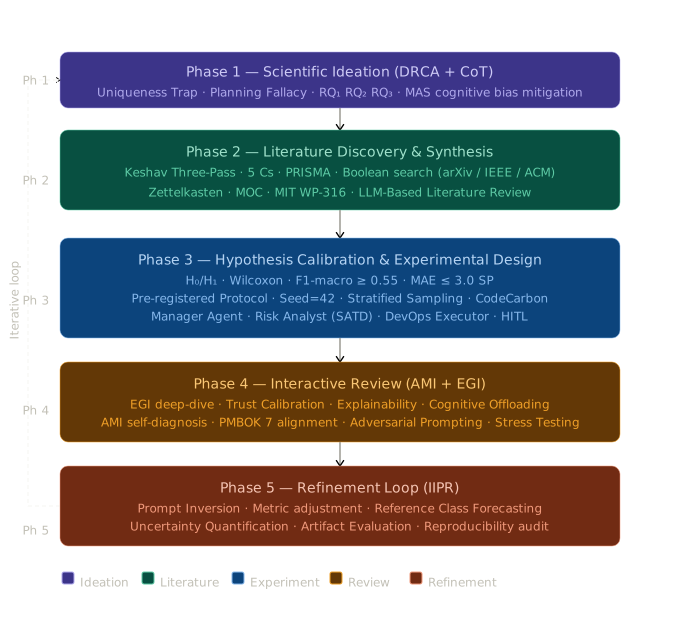
PUMA integrates a layered stack of research methodologies — from the macro study design down to the micro level of individual prompting strategies.
Primary Research Methods
- EBSE + SLR / PRISMA: Evidence-Based Software Engineering and Systematic Literature Review (reported using PRISMA 2020) map the state of the art on LLM agents.
- DSR — Design Science Research: Hevner et al.’s framework treats the PUMA agent platform as an artifact to be evaluated against utility criteria.
- Grounded Theory: Used for qualitative analysis of emergent patterns — particularly for analysing agent reasoning traces and failure modes.
- MIT Student Method: A structured research workflow (vision → steps → news) from the MIT AI Lab (Working Paper WP316). Literature notes follow a three-pass reading protocol (Keshav 2007).
Prompting & Agent Engineering Frameworks
| Framework | Category | Description |
|---|---|---|
| RCOIF | Prompting | Role · Context · Objective · Instructions · Format. Default format across the vault. |
| EGI | Prompting | Explicit Goal-setting and Iterative refinement loop. |
| AMI | Prompting | Anchored Multi-step Inference to prevent reasoning drift. |
| DRCA | Prompting | Decompose · Reason · Critique · Answer. |
| IIPR | Prompting | Intent · Information · Process · Result. |
| CoT | Prompting | Chain-of-Thought prompting for step-by-step reasoning. |
| Few-Shot | Prompting | Provides 3–8 labelled examples in the prompt context. |
| Zero-Shot CoT | Prompting | Model reasons without examples, guided by “think step by step”. |
| CDD | Development | Context-Driven Development: treatments of context window as primary design space. |
| Agent OS | Architecture | Framework for orchestrating specialized agents through a shared interface. |
| Agent Prompt Engineering | Architecture | Discipline of designing and testing system prompts for autonomous agents. |
Note Types & Prefixes
Every note carries a prefix encoding its type, enabling Dataview queries, filtered searches, and Zettelkasten linking. The lifecycle flows: raw capture → literature note → permanent note → project reference → MOC entry.
| Prefix | Type | Location | Example |
|---|---|---|---|
FL- | Fleeting Note | 10 - Inbox | FL-2026-03-15-LLM-idea |
LN- | Literature Note | 20 - Literature | LN-Tawosi2022-TAWOS |
PN- | Permanent Note | 30 - Permanent | PN-Few-Shot-Prompting |
ST- | Structure Note | 30 - Permanent | ST-Prompting-Strategies |
SRC- | Source Note | 30 - Permanent/36 Sources | SRC-Keshav-2007-HowToReadPaper |
PER- | Person Note | 30 - Permanent/37 Persons | PER-Yao-Shunyu |
RES- | Results Note | 30 - Permanent/34 Results | RES-Results-Index |
PR- | Project Note | 40 - Projects | PR-PUMA-Ch1-Introduction |
SP- | Spec Note | 40 - Projects/Specs | SP-Triage-Agent |
EX- | Experiment Note | 40 - Projects/Experiments | EX-Llama32-ZeroShot-Triage |
PT- | Prompt Template | 60 - Resources/61 Prompts | PT-OpenCode-RCOIF-Research |
WF- | Workflow Note | 60 - Resources/62 Workflows | WF-SLR-Pipeline |
CL- | Checklist | 60 - Resources/63 Checklists | CL-Quality-Checklists |
BIB- | Bibliography | 60 - Resources/65 Bibliographies | BIB-Master-APA7 |
KW- | Keyword Map | 60 - Resources/64 Glossary | KW-Category1-AI-Agents |
VID- | Video Note | 20 - Literature/20.4 Videos-Podcasts | VID-AGT-001-Karpathy-RAG |
GT- | GTD Note | 90 - GTD | GT-Weekly-Review-2026-W10 |
MC- | Map of Content | 80 - MOC | MC-LLM-Benchmarks |
BMAD- | BMAD Agent Doc | 40 - Projects/BMAD-Agents | BMAD-PRD-PUMA |
The .claude Folder & Skills
The .claude/ folder is the AI integration layer of the vault. It contains the PUMA skill library (custom skills) and the obsidian-skills plugin. These turn OpenCode into a domain-aware research assistant that understands vault conventions and research methodologies.
PUMA Custom Skills
+ Click to expand
- puma-core: Defines project identity, Johnny Decimal rule set, and thinking framework.
- puma-orchestrator: Protocols for coordinating specialized agents.
- puma-agent-design: Guidelines for agent roles, tool specs, and memory architecture.
- puma-agile: Agile conventions adapted for AI-assisted development cycles.
- puma-bmad: BMAD method implementation: PRD formats and agent rosters.
- puma-cdd: Context-Driven Development rules and context window budgeting.
- puma-experiment: Protocol for reproducible experiment notes and logging.
- puma-openspec: Standards for writing machine-readable specifications.
- puma-sdd: Spec-Driven Development conventions (spec-first workflow).
- puma-spec-kit: Templates for architecture, agents, and datasets.
- puma-moc: Rules for creating and maintaining Maps of Content.
- puma-zettelkasten: Atomic note principles and Zettelkasten Hub rules.
- puma-rcoif: Implements the RCOIF prompting framework.
- puma-cot: Chain-of-Thought prompting guidelines.
- puma-prompting: Master skill consolidating all prompting frameworks.
- puma-advanced-prompt: Self-consistency, multi-turn design, and red-teaming.
- puma-research: Master research skill for the PUMA pipeline.
- puma-literature-review: SLR execution protocol (PICO/PRISMA).
- puma-keshav-method: Three-pass paper reading protocol implementation.
- puma-mit-student-method: vision → steps → news structure.
- puma-dataview: Dataview query syntax for dynamic indexing.
- puma-research-tools: Reference for Semantic Scholar, ResearchRabbit, etc.
- puma-zotero: Integration conventions for citations.
- puma-vault-architecture: Johnny Decimal address ranges and folder semantics.
- puma-obsidian-governance: Plugin configuration and frontmatter schema.
- puma-rules: Binding governance rules (Always/Never).
- puma-anti-patterns: Catalogue of mistakes to avoid (e.g., flat file dumps).
- puma-obsidian-cli: Instructions for interacting with the vault from the terminal.
Obsidian-Skills Plugin
+ Click to expand
- obsidian-markdown: Reference for callouts, embeds, and frontmatter.
- obsidian-cli: Reference for
obsidian create,search, andopencommands. - obsidian-bases: Reference for the native database feature.
- json-canvas: JSON Canvas format specification for programmatic editing.
- defuddle: Skill for extracting clean text from web pages.
Tools, Platforms & Research Ecosystem
Purpose
This section systematically documents and provides traceability for the entire ecosystem of tools, digital platforms, and public profiles utilized in the development of the PUMA Project. Transparency in the use of research and development tools is a primary ethical and methodological requirement, especially when employing Generative AI systems as epistemic partners in the research process.
Primary Access Points & Repositories
Code & Documentation Hubs
All technical artifacts, specifications, and the research vault are hosted on GitHub under the pumacp organization.
| Resource | Description | URL |
|---|---|---|
| GitHub Organization | Main project hub | https://github.com/pumacp |
| PUMA Vault (Source) | Obsidian Vault source files | https://github.com/pumacp/puma-vault |
| PUMA Vault (Web) | Live web version of the Vault | https://pumacp.github.io/puma-vault/ |
| GitHub Vault Wiki | Project documentation wiki | https://github.com/pumacp/puma-vault/wiki |
| PUMA Code Repo | Main application source code | https://github.com/pumacp/puma |
| YouTube Playlist | Demonstrations & Video logs | https://www.youtube.com/feed/playlists |
AI-Powered Research Platforms
NotebookLM Research Notebooks
The following notebooks represent specialized AI contexts trained on the project’s specific bibliographic corpus for the project and deep analysis.
- PUMA - 1. AI Agents & Swarm Intelligence | Access Notebook
- PUMA - 1. Scientific Ideation | Access Notebook (Preview)
- PUMA - 2. Literature Discovery | Access Notebook
- PUMA - 3. Systematic Review | Access Notebook
- PUMA - 4. Theoretical Framework | Access Notebook
- PUMA - 5. Hypothesis Generation | Access Notebook
- PUMA - 6. Experimental Design | Access Notebook
- PUMA - 7. Critical Analysis | Access Notebook
- PUMA - 8. Scientific Writing | Access Notebook
- PUMA - 9. Review Output | Access Notebook
Consensus Academic Search Profiles
Publicly shared searches and bibliographies focused on evidence-based AI research.
- Advanced Academic Research Prompt: View Search
- Master Bibliography: View Search
- Step-by-Step Research Methodology:
Knowledge & Bibliographic Management
Zotero Public Library
Centralized metadata and PDF management for all project citations.
RSS/API Access: JSON/Atom Feed
Researcher.Discovery Reading Lists
Curated collections for specific project domains.
| Collection Name | Link |
|---|---|
| Main PUMA Library | Access List |
| LLM Benchmark Core | Access List |
| Project Management Benchmarks | Access List |
| Local LLM Benchmarking | Access List |
| LLM Based Agents | Access List |
| Phase 1: Scientific Ideation | Access List |
| Phase 2: Literature Discovery | Access List |
| Phase 3: Systematic Review | Access List |
| Phase 4: Theoretical Framework | Access List |
| Phase 5: Hypothesis Generation | Access List |
| Phase 6: Experimental Design | Access List |
| Phase 7: Critical Analysis | Access List |
| Phase 8: Scientific Writing | Access List |
| Phase 9: Review Output | Access List |
ResearchRabbit & Storage
- ResearchRabbit Map 1: Folder Share 1
- ResearchRabbit Map 2: Folder Share 2
- Google Drive (Full Papers Repo): Access PDF Collection
Generative AI Research Partners
Custom AI Profiles & Spaces
- Gemini (PUMA GEM): Access Profile
- Perplexity PUMA Space: Access Space
Research Session Artifacts
- Claude (Scientific Ideation Session): [View Chat Share](https://the LLM platform/share/b3b80d43-d1bd-49ac-a067-53bd3d7c0f93)
- ChatGPT (Scientific Ideation Session): View Chat Share
Ecosystem Table
| Category | Primary Tools | Methodology / Key Standard |
|---|---|---|
| D.1 Repositories | GitHub, Pages, Wiki | SDD, Open Source, DSR |
| D.2 AI Research | NotebookLM, Consensus, R.Discovery | SLR, PRISMA, Keshav |
| D.3 AI Assistants | Claude, ChatGPT, Gemini | Prompt Engineering, Chain-of-Thought |
| D.4 Documentation | Obsidian, GitHub Pages | Zettelkasten, PARA, Johnny Decimal |
Full Index of Files
All files are listed as clickable relative links, organized by folder following the Johnny Decimal structure.
Root
00 — Meta 25 files
Dashboards
Plugins-Config
Snippets
Templates
+ Click to expand
- Daily Note Template.md
- Idea Template.md
- Log Template.md
- MOC Template.md
- Permanent Note Template.md
- Private Note Template.md
- Task Template.md
- Template-Book-Note.md
- Template-Daily-Review.md
- Template-Experiment-Note.md
- Template-Keshav-ThreePass.md
- Template-Literature-Note-Paper.md
- Template-Permanent-Note.md
- Template-Person-Note.md
- Template-Prompt-Note.md
- Template-Source-Note.md
- Template-Sprint-Board.md
- Template-Structure-Note.md
- Template-Video-Tool-Repo-Notes.md
- Template-Weekly-Review.md
10 — Inbox 4 files
Fleeting-Notes
Quick-Capture
20 — Literature ~160 files
20.1 Papers
+ Click to expand
Agent-Architectures
+ Click to expand
- LN-Arora-2024-MASAI.md
- LN-AuthenticatedWorkflows-2026.md
- LN-Chen-2024-RootCauseAnalysis.md
- LN-Flow-2025-AgenticWorkflow.md
- LN-GraphAgent-2024.md
- LN-HAIF-2026-HumanAIIntegration.md
- LN-HiveMind-2025-SwarmOptimization.md
- LN-Huang-2024-InternetOfAgents.md
- LN-IntelligentSparkAgents-2024.md
- LN-Jimenez-2023-SWEbench.md
- LN-MAGIS-2024-GitHubIssues.md
- LN-Masterman-2024-AgentArchSurvey.md
- LN-Ning-2025-AgentTaxonomy.md
- LN-OrchestratingHumanAI-2025.md
- LN-Tang-2025-LLMOrbit.md
- LN-Wang-2024-OpenHands.md
- LN-Yao-2023-TreeOfThoughts.md
- LN-Yu-2025-DynTaskMAS.md
Agentic-Science
AI-Knowledge-Generation
+ Click to expand
AIOps-DevOps
- LN-Bruneliere-2022-AIDOaRt.md
- LN-Chen-2025-AIOpsLab.md
- LN-Hou-2025-MCP-Security.md
- LN-Weichbroth-2025-EmotionsSurvey.md
Effort-Estimation
LLM-Agents-General
+ Click to expand
PM-AI-Convergence
- README.md
- LN-Assalaarachchi-2026-AgenticSPM.md
- LN-Cinkusz-2025-CognitiveAgentsAgilePM.md
- LN-Shao-2025-FutureOfWork.md
Reproducibility-SE
Research-Methods
Scheduling-MAS
Triage-Benchmarks
20.2 Books
20.3 Datasets
20.4 Videos-Podcasts
+ Click to expand
YouTube / Context-Engineering
+ Click to expand
YouTube / Dev-Tools-IDE
+ Click to expand
- LN-Videos-Dev-Tools-IDE.md
- VID-DEV-001 · Demo De Ticket a Pull Request en 30 minutos
- VID-DEV-002 · 12 OpenCode Features Every Engineer Should Know
- VID-DEV-003 · AI Testing Series Day 1 — Test AI 10x Faster
- VID-DEV-004 · How I use Cursor — my best tips
- VID-DEV-005 · OpenCode — Probablemente la mejor herramienta
YouTube / LLM-Agents-MultiAgent
+ Click to expand
- LN-Videos-LLM-Agents-MultiAgent.md
- VID-AGT-001 · Karpathy: Just Replaced RAG With Obsidian
- VID-AGT-002 · 12 Factor Agents — Patterns of reliable LLM apps
- VID-AGT-003 · 3 Advanced AI agent design patterns
- VID-AGT-004 · Flujos de trabajo utilizando Agentes (Andrew Ng)
- VID-AGT-005 · Building AI Agents that actually work
- VID-AGT-006 · CrewAI vs AutoGen vs LangGraph — Features Pros
- VID-AGT-007 · Construyendo IA Fiable: Evals, Trazabilidad
- VID-AGT-008 · Karpathy’s Autoresearch: Near Human Performance
- VID-AGT-009 · The only AutoResearch tutorial you’ll ever need
- VID-AGT-010 · No construyas Agentes IA hasta que veas esto
- VID-AGT-011 · AI Agent Specialization: RAG vs Fine-tuning
- VID-AGT-012 · Orquestación de Agentes — Control Determinista
- VID-AGT-013 · Agentes de IA y LangGraph
- VID-AGT-014 · Codelab: Construyendo un Sistema Multi-Agente
- VID-AGT-015 · MAIA Master Class: De NLP a la IA Agéntica
YouTube / Local-LLM-Ollama
+ Click to expand
YouTube / MCP-Protocols
+ Click to expand
YouTube / Miscellaneous
+ Click to expand
- LN-Videos-Miscellaneous.md
- VID-MISC-001 · A Visual Tour of Modern LLM Architectures
- VID-MISC-002 · Supabase con IA: CLI, MCP, Skills
- VID-MISC-003 · Gemini CLI — Google’s Free Open Source Coding
- VID-MISC-004 · CrewAI vs AutoGen vs LangGraph — Features
- VID-MISC-005 · How to Permanently Fix Your Forgetful AI Agent
YouTube / Observability-Testing
+ Click to expand
- LN-Videos-Observability-Testing.md
- VID-OBS-001 · Construyendo IA Fiable: Evals, Trazabilidad
- VID-OBS-002 · Curso evaluación LLM con Promptfoo
- VID-OBS-003 · AI Testing Series Day 2 — Variable Injection
- VID-OBS-004 · Introduction to Observability and Prometheus
- VID-OBS-005 · E124: Creando agentes con PydanticAI
YouTube / PM-Agile-AI
+ Click to expand
YouTube / RAG-VectorDB
+ Click to expand
- LN-Videos-RAG-VectorDB.md
- VID-RAG-001 · How to Build a Scalable RAG System
- VID-RAG-002 · Introducing RAG 2.0 — Agentic RAG
- VID-RAG-003 · GraphRAG LOCAL — Soluciona PARA SIEMPRE los problemas
- VID-RAG-004 · MISO Master Class: RAG en entornos reales
- VID-RAG-005 · The Future of RAG is Agentic
- VID-RAG-006 · LM Studio + AnythingLLM — Process Local Documents
- VID-RAG-007 · Por qué NO uso RAG y qué uso en su lugar
- VID-RAG-008 · How to Build Scalable Agentic RAG with Dify
- VID-RAG-009 · RAG 2.0 — Olvida las alucinaciones de tu IA
- VID-RAG-010 · Did you like NotebookLM? Create it yourself
YouTube / Research-Literature
+ Click to expand
- LN-Videos-Research-Literature.md
- VID-RES-001 · How To Do A Literature Review STRESS FREE
- VID-RES-002 · This EMBARRASSING AI Generated Paper Exposed
- VID-RES-003 · I Compared Every Popular AI Literature Review Tool
- VID-RES-004 · Ditch The Old Google Scholar — This AI Method
- VID-RES-005 · How To Use Research Rabbit
- VID-RES-006 · La IA que todo INVESTIGADOR debería conocer
YouTube / SDD-Specs-BMAD
+ Click to expand
- LN-Videos-SDD-Specs-BMAD.md
- VID-SDD-001 · Spec-Driven Development in the Real World
- VID-SDD-002 · The Official BMad Method Masterclass
- VID-SDD-003 · BMAD Method V6 — PRD Architecture Agent
- VID-SDD-004 · AgentOS VS BMAD VS Spec Kit
- VID-SDD-005 · Plan, Specify and Implement with Spec Kit
- VID-SDD-006 · OpenSpec is Insane — Spec-Driven Development
- VID-SDD-007 · BMAD Method Agent Cheatsheet (From Mary)
- VID-SDD-008 · Me PIDIERON que muestre CÓMO trabajo con AI
- VID-SDD-009 · Gemini CLI Conductor — Spec-Driven Development
- VID-SDD-010 · Spec-Driven Development for AI Agents
- VID-SDD-011 · BMAD vs Open Spec vs Spec Kit
- VID-SDD-012 · El ECOSISTEMA de IA que le falta a tu agente
20.5 Repos-Code
+ Click to expand
20.6 Tools
+ Click to expand
20.7 Blog-Web
20.8 Conferences
30 — Permanent (Zettelkasten) 35 files
30 Zettelkasten-Hub
31 Concepts
+ Click to expand
- README-Concepts.md
- PN-ActiveReading-CognitivePractice.md
- PN-Agentic-Science-Paradigm.md
- PN-AI-Scientific-Knowledge-Generation.md
- PN-CoT-FewShot-Prompting.md
- PN-IssueTriage-StoryPoints.md
- PN-KeyConcepts-Agents-Reproducibility-RedTeam.md
- PN-LLM-Local-vs-Cloud.md
- PN-MultiAgent-ArchitecturePatterns.md
- PN-PUMA-within-AgenticScience-Trajectory.md
- PN-RAG-Embeddings-VectorDB.md
- PN-ReAct-AgentPattern.md
- PN-ToolSelection-PUMA.md
32 Methods
+ Click to expand
33 Frameworks
+ Click to expand
34 Results
36 Sources
37 Persons
+ Click to expand
40 — Projects 19 files
41.1 Introduction
41.2 Literature-Review
41.3 Methods
41.4 Results
+ Click to expand
41.5 Discussion
41.6 Specs
+ Click to expand
41.7 Experiments
+ Click to expand
41.8 Sprint-Boards
41.9 BMAD-Agents
50 — Areas 10 files
51 Research
+ Click to expand
52 Writing
53 Code-Dev
54 Sustainability
55 Ethics
56 Smart-PMO
60 — Resources ~60 files
61 Prompts — General
61.1 LLM-Tools
- PT-Advanced-Prompts-IIPR-Anchoring-AgentOS.md
- PT-OpenCode-RCOIF-Research.md
- PT-LLM-Tools-All-Prompts.md
61.2 Research-Tools
61.3 Dev-Tools
61.5 BMAD-Prompts
Methodologies
+ Click to expand
Phase 1 — Research / 01 Literature-Exploration
+ Click to expand
- PT-P1S1-001-SemanticScholar-CoreSearch.md
- PT-P1S1-002-SemanticScholar-TaskSpecific.md
- PT-P1S1-003-GoogleScholar-BroadSweep.md
- PT-P1S1-004-arXiv-FrontierScan.md
- PT-P1S1-005-Consensus-EvidenceSearch.md
- PT-P1S1-006-Undermind-HighPrecision.md
- PT-P1S1-007-ResearchRabbit-SeedExpansion.md
- PT-P1S1-008-Elsevier-Scopus-Search.md
Phase 1 — Research / 02 Scientific-Mapping
+ Click to expand
Phase 1 — Research / 03 Structured-Extraction
+ Click to expand
Phase 1 — Research / 04 Conceptual-Synthesis
+ Click to expand
Phase 1 — Research / 05 Hypothesis-Generation
+ Click to expand
Phase 1 — Research / 06 Experimental-Design
+ Click to expand
Phase 1 — Research / 07 Critical-Review
+ Click to expand
Phase 2 — Development
+ Click to expand
62 Workflows
+ Click to expand
63 Checklists
64 Glossary
+ Click to expand
65 Bibliographies
+ Click to expand
66 Johnny-Decimal-Index
70 — Archive 3 files
80 — MOC (Maps of Content) 12 files
81 Topic-Maps
+ Click to expand
82 Index
90 — GTD 3 files
.claude — AI Skills & Governance 45 files
.claude / puma / core
.claude / puma / development
+ Click to expand
.claude / puma / integration
.claude / puma / knowledge
.claude / puma / meta
.claude / puma / prompting
+ Click to expand
.claude / puma / research
+ Click to expand
.claude / puma / tools
+ Click to expand
.claude / puma / vault
+ Click to expand
.claude / obsidian-skills
+ Click to expand
Vault Guide v2.0 · June 2026